
FingerPrint: A 360° Network Security Ecosystem
Finger Print offers cybersecurity solutions for private and business networks.
Client
FingerPrint
Industry
Cybersecurity
Role
UX/UI design (Mobile & Web)
Timeline
~8 months
(Total engagement)
Overview
Finger Print offers cybersecurity solutions for private and business networks. My engagement began with designing a user-friendly Mobile App (B2C) for families managing their home security. Following the app’s successful design phase, the client commissioned an expansion of the product suite to include a BI Dashboard (B2B) tailored for insurance providers. My challenge was to maintain brand consistency while adapting the user experience for two vastly different audiences.
Part I: The Mobile App
My Role:
I joined the project after the company replaced their previous designer. While they were satisfied with the initial visual direction, they were seeking a more structured and efficient workflow. My role was to take full ownership of the design process, build upon the existing foundation, and enhance the product both visually and functionally- all within tight timelines and without formal product documentation.
Process & Approach:
My main point of contact was the company’s product manager. Although there was no formal specification document, we established a structured, agile-like workflow that allowed us to stay aligned and move quickly. We held regular follow-up meetings every one to two weeks, where we reviewed progress, discussed feedback, and aligned on upcoming requirements.
After each meeting, I independently translated the product manager’s inputs into a clear task list and set my own priorities and timelines accordingly. I was responsible for planning the design roadmap, defining the scope of each iteration, and ensuring that design deliverables were ready in sync with development needs. This process gave me both flexibility and accountability, and allowed me to move efficiently even when product decisions were evolving.
Throughout the project, I maintained close communication with both the product manager and the development lead, ensuring that design and implementation were aligned and feasible. Despite the fast pace and occasional scope shifts, the workflow remained organized and goal-oriented- allowing us to continuously ship meaningful improvements.

The Result:
This project not only improved the overall user experience of the mobile product, but also established a highly effective working relationship with the client- leading to two additional product design engagements:
-
Insurance Scan Report- Dashboard for assessing network security for insurance purposes
-
Admin & BI System- a management platform for monitoring customer activity and system-wide insights

1/ Home Dashboard
A simplified overview of network status
The homepage acts as a central hub, displaying the number of connected devices, household members, and general risk level. I restructured the layout using modular cards and soft shadows, allowing users to digest key information at a glance. Color hierarchy and iconography help users distinguish between device types and statuses without cognitive overload.
2/ Family Overview
Managing household members and their connected devices
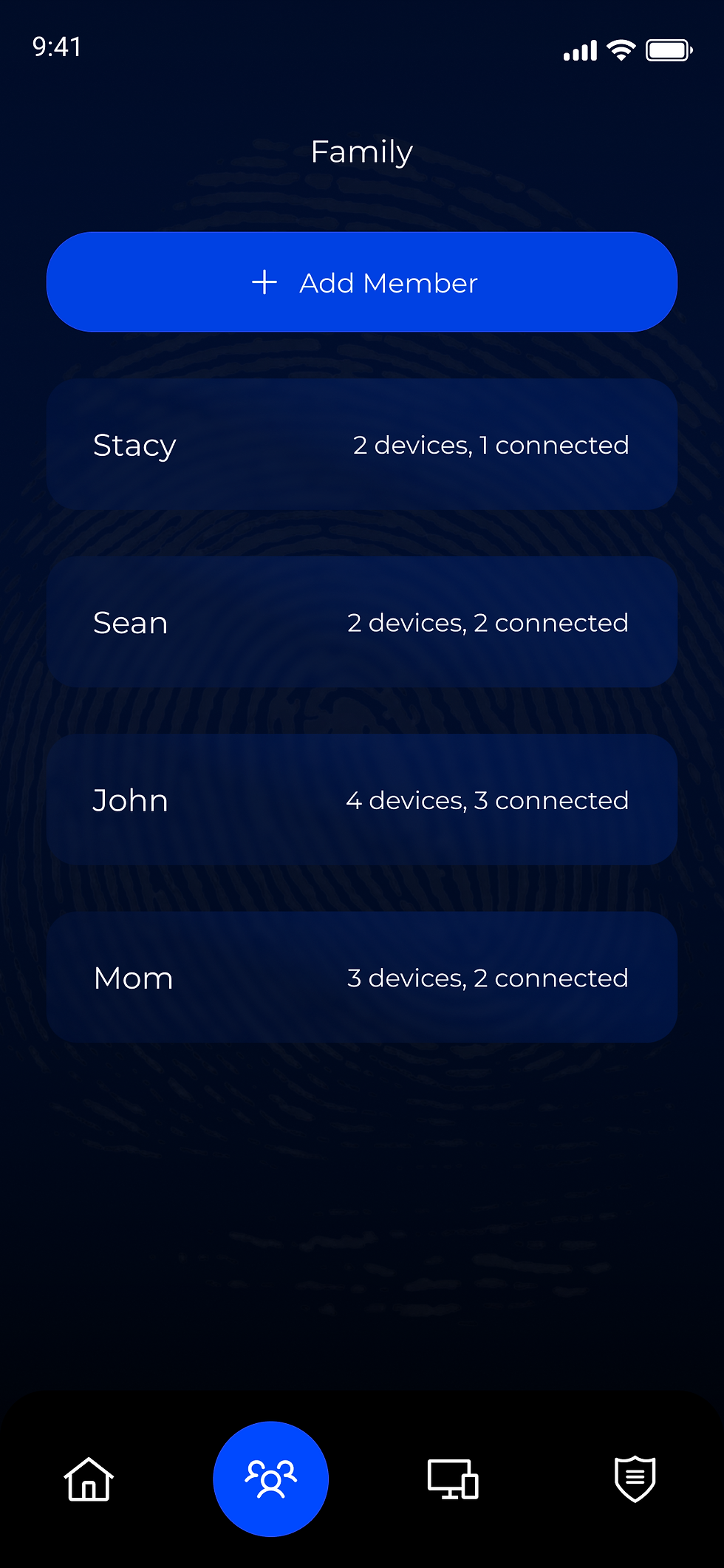
This section gives users a quick overview of who’s connected in the household, how many devices each person owns, and allows direct access to manage their settings. The design prioritizes clarity, friendliness, and at-a-glance insights.

3/ Device Controls & Insights
Full control over each device in the network
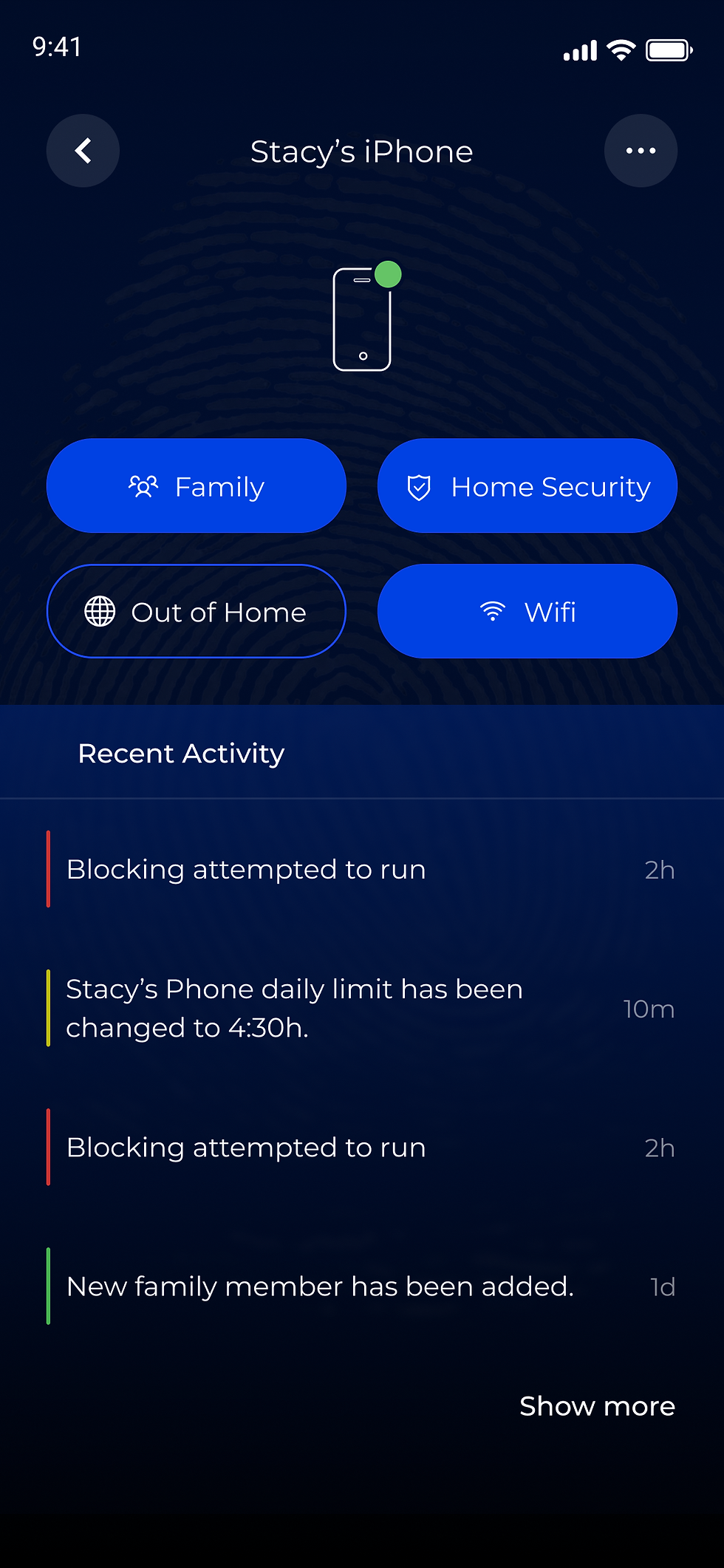
Each device view provides full control and visibility- from pausing internet access to adjusting security modes. Alongside actionable settings, users can monitor device-specific activity logs and screen time analytics. The combination of technical metadata with clear visual summaries helps families make informed decisions and manage usage habits more effectively.
4/ Off-Time Scheduling
Creating and managing internet access schedules
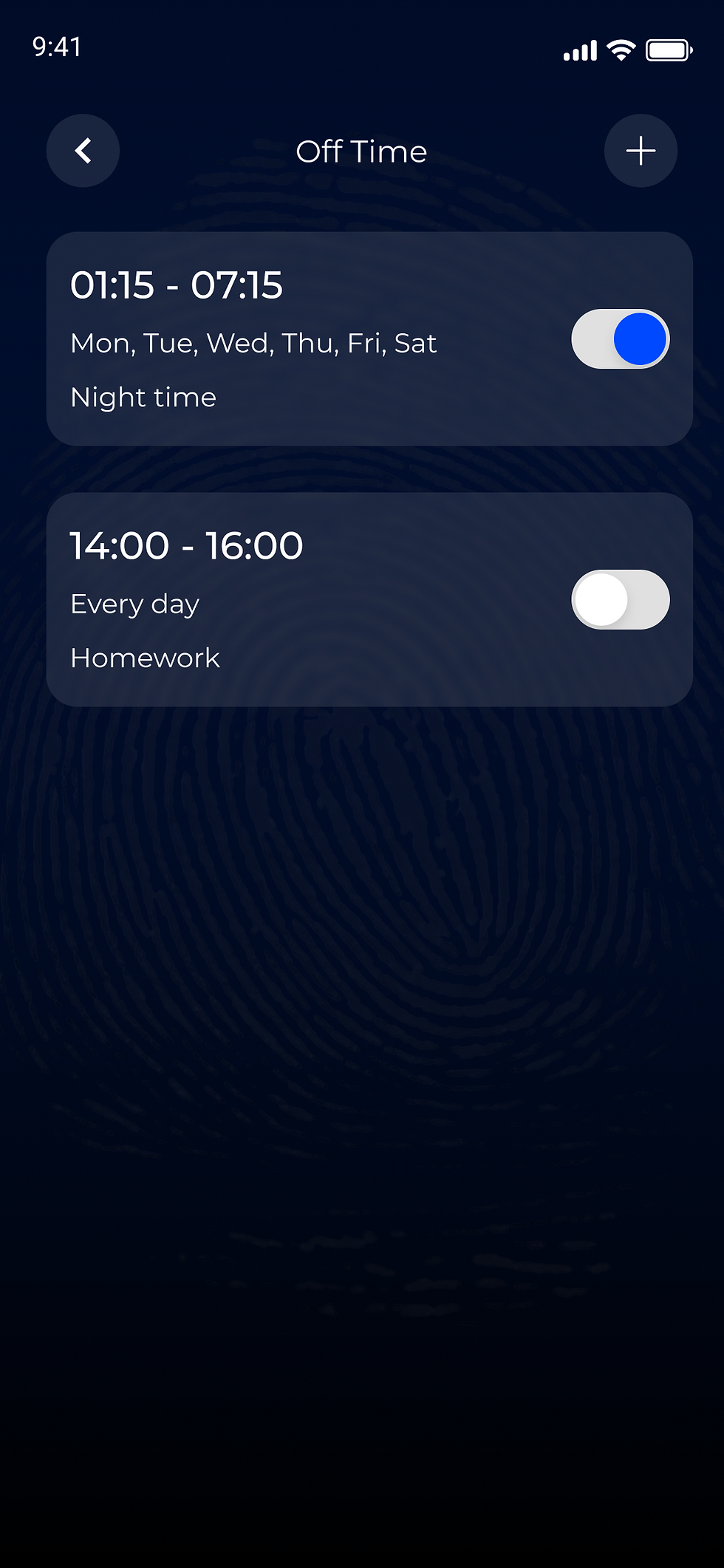
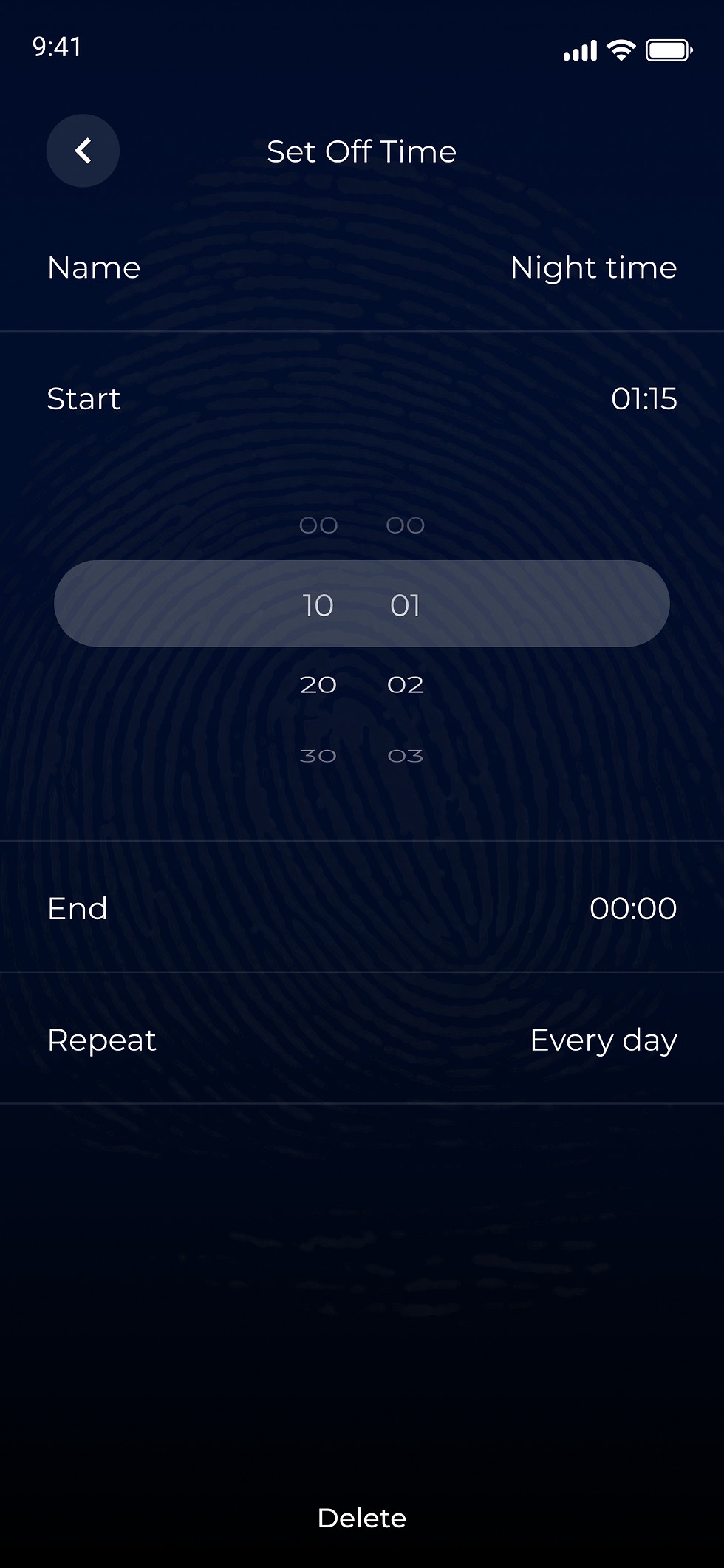
Parents can define specific time ranges to block internet usage for selected devices. The flow includes a high-level list view and a dedicated time-picker interface, designed for ease of use and intuitive scheduling.

5/ Devices Inventory
Browse and filter all devices on the network
A centralized hub to view, filter, and manage devices- grouped by type or ownership. The design emphasizes quick scanning and straightforward interactions for daily use.

6/ Security Log
Browse and filter all devices on the network
A centralized hub to view, filter, and manage devices- grouped by type or ownership. The design emphasizes quick scanning and straightforward interactions for daily use.
Part II: B2B Dashboard for Insurance
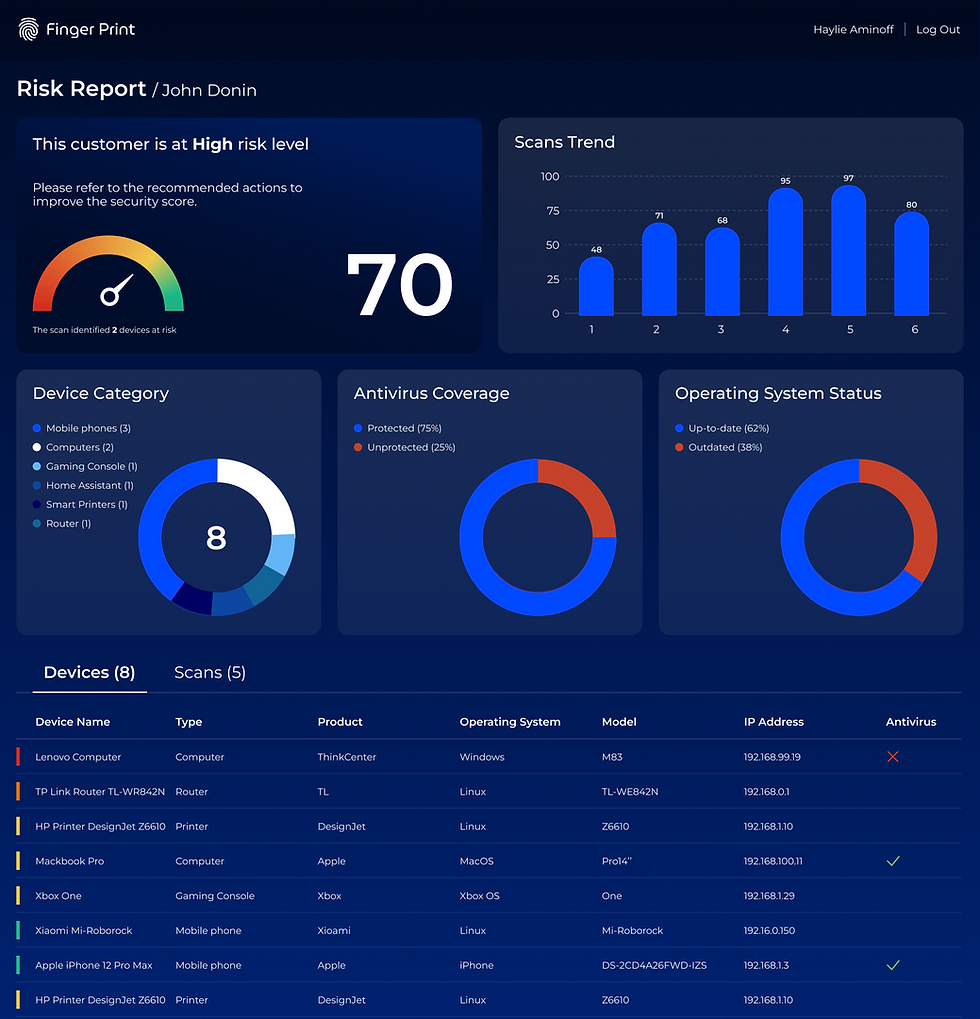
Following the success of the mobile app, the client asked to expand the visual language to a B2B product. I designed a single-page BI dashboard tailored for insurance providers to evaluate network risk levels.
The Challenge:
Adapting the consumer-friendly mobile design into a data-heavy, professional desktop interface without losing the brand identity.
Reflections & Outcomes
Working on Finger Print’s ecosystem was a valuable experience in scalability. It challenged me to apply a single brand identity across two distinct user experiences: a friendly tool for families (Mobile) and an analytical tool for businesses (Web Dashboard).
The trust built during the mobile phase allowed us to move quickly on the dashboard, proving that a strong design system can successfully adapt to different platforms and user needs.
